



 Sign in
Encrypted file exchange for everything that must stay confidential
For firms, practices and businesses: send files end-to-end encrypted – with a signed proof of delivery.
No payment details · Trial ends automatically
- Developed & operated in Germany
- End-to-end encrypted
- Contractual confidentiality (§ 203 StGB)
- Signed proofs of delivery
Sign in
Enter the six-digit code from your authenticator app.
Lost access to your authenticator app or security key? Your organisation’s administrators can reset your access.
Sign in with your security key or passkey alone. No password, no code — you confirm with your PIN, fingerprint or face.
No account yet?
For your profession Applies to: Germany
For professions bound by professional secrecy
and for everyone else who takes data protection seriously
Our data processing agreement contains what § 203 StGB (German Criminal Code) requires of your service provider:
- Duty of confidentiality
- Notice of criminal liability
- Access only as far as necessary
Tax advisers
End-to-end, with no individual consent needed from clients.
Details for your professionBusinesses and the self-employed
For anything that should not sit unencrypted in other people’s mailboxes.
Try it free for 14 days →- Contracts, personnel files, balance sheets
- Proof of when and from where files were downloaded
- Upload box for partners without an account
Notes on the legal position
No regulator or professional body certifies services of this kind. Choosing a service provider with care remains your duty under your professional rules.
The information on the legal position on this page is general information, without any warranty as to completeness or currency, and does not constitute legal advice. Only our contracts are binding.
How it works
How a transfer works
-
Choose the file
Encryption takes place in your browser, before anything leaves your computer.
The password is generated there too, not on the server.
-
Send link and password separately
Two prepared emails. Anyone who intercepts just one gets nothing.
We can also send the link for you. The password always stays with you.
-
Proof of delivery, ready to file
Every download recorded with date and time, IP address and location – plus the checksum of every file.
Proves which document arrived. As a signed PDF/A with a timestamp from an independent authority.
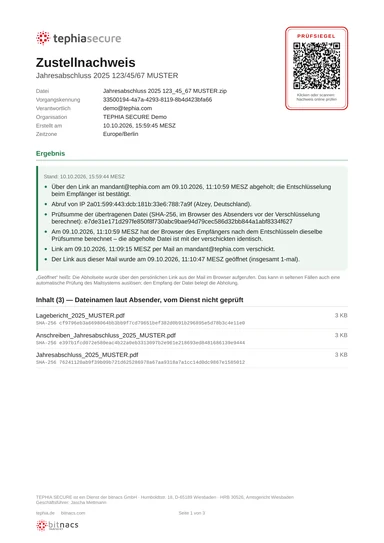
How your proofs are secured
| In every planSignature with our certificate | Add-on · coming soonQualified electronic seal | |
|---|---|---|
| Any change to the PDF invalidates the signature | included | included |
| Timestamp from an independent authority | included | included |
| Hash chain with daily chain seal | included | included |
| Checksum (SHA-256) of every file, confirmed by the recipient | included | included |
| Verifiable online, without an account | included | included |
| Display in Adobe Reader | “Validity unknown”1 | Valid |
| Legal presumption of authenticity (Art. 35(2) eIDAS) | —not included | included |
| Useful for | Your records, clients | Courts, authorities, the other party |
1 Not an error: our certificate is not on the EU trust list that Reader recognises. You can check integrity online or using the certificate fingerprint.
- Signature: any change is detected
- Timestamp from an independent authority
- Hash chain with daily chain seal
- Checksum of every file, confirmed by the recipient
- Verifiable online, without an account
- Adobe Reader shows “Valid” instead of “Validity unknown”
- Legal presumption of authenticity (Art. 35(2) eIDAS)
- Useful for courts, authorities, the other party
What it is built for
We cannot read the contents
Files are stored on the server in encrypted form only. We never have the key.
Tamper-evident proofs
With a checksum of every file, confirmed by the recipient. Any change is detected.
For other parties too, without an account
Clients upload files to your upload box via a link, without registration.
Sign-in on your terms
Microsoft Entra ID, a password with a second factor, or a FIDO2 security key.
Straight from Outlook
Send securely and request documents without leaving Outlook.
Every detail explained openly: how secure is TEPHIA SECURE? Set up the Outlook add-in
Location
Where your data is kept
- GermanyStandard
-
Data centre in Germany, German provider with no parent company outside the EU.
For you, this means: no provider abroad that you have to justify.
Legal basis (§ 62a Abs. 4 StBerG, § 43e Abs. 4 BRAO)
The servers are located in a data centre in Germany, operated by a German provider with no parent company outside the EU. German law therefore applies to storage directly, and you do not need to justify using a provider abroad — German professional law permits service providers abroad only where secrecy is comparably protected (e.g. § 62a Abs. 4 StBerG, § 43e Abs. 4 BRAO).
- EU and EEAOn request
-
A dedicated instance in any EU or EEA country: its own server, its own contract, the same software.
- SwitzerlandNot for now
-
Abroad under your professional law, and its surveillance obligations (VÜPF) are currently being renegotiated.
Background
Under data protection law, Switzerland is a safe country, but under your professional law it counts as abroad: you would have to justify and document comparable protection yourself. In addition, an extension of surveillance obligations for communication services is being negotiated there (revision of the VÜPF). Until the outcome is clear, we do not offer a Swiss location.
Questions
Frequently asked questions
I have lost the password of a transfer. Can you send it to me?
No. The password is created in your browser and stored nowhere. Nobody can recover it, not even the operator. That is the core of end-to-end encryption. Simply send the files again, with a new link and a new password.
And if the password of an upload box is missing?
Search your inbox for the email “Access details for your upload box …”. In the open upload box, Where is the password? helps. Your client also knows the password. As a last resort there is Ask the sender again; see Upload box.
The link has expired. What now?
An expired transfer is deleted and cannot be extended. Send the files again. For an expired upload box, create a new one.
Can I put the link and the password in the same email?
Please do not. Whoever intercepts that one email would have both. Use two channels, for example the link by email and the password by phone. The easiest way is to let TEPHIA SECURE send the link; see Sending files.
Does the recipient need an account?
No. Downloading and uploading work without an account and without installing anything, just in the browser.
Can the operator read my files?
No. The files are only stored on the server in encrypted form, and the key is never stored. What the server does see is described in the Overview.
Pricing
Prices
- Starter: €39.00 per month · €390.00 per year · up to 5 users · up to 500 MB per transfer
- Team: €119.00 per month · €1,190.00 per year · up to 20 users · up to 1 GB per transfer
- Business: €299.00 per month · €2,990.00 per year · up to 50 users · up to 2 GB per transfer
- proofs of delivery with hash chain, PDF and CSV
- upload boxes for external senders without an account
- Microsoft Entra ID, or password with a second factor
- Outlook add-in: send securely and request documents, right from Outlook Outlook 2021 and later, Microsoft 365 and Outlook on the web – with Exchange Online and Exchange Server (on-premises)
- Integration with practice management software, ERP and CRM systems coming soon
coming soon Add-on: proofs of delivery with a qualified electronic seal, available with every plan. Learn more
- Cancellable monthly
- Card or SEPA
- Data processing agreement under Art. 28 GDPR included
Prices plus VAT. Annual plan with a 12-month term. A service of bitnacs GmbH.
Are you an IT client of bitnacs GmbH? From the Business package upwards, TEPHIA SECURE is included free of charge, set-up included. More at bitnacs (in German)